Best Resin 3D Printer Slicers of 2026
A resin 3D printer is mechanically simple—an LCD screen, a UV light source, and a single vertical Z-axis leadscrew. Almost every decision that separates a razor-sharp 1:32 slot car driver figure or tabletop miniature from a failed blob stuck to the vat film happens before the printer starts, inside your resin slicer.
For most hobbyists, Lychee Slicer is the friendliest everyday workspace for orienting and supporting models, while Chitubox remains the rock-solid native backbone for ChiTu-board printers like Elegoo and Phrozen. Open-source PrusaSlicer shines at automated orientation and hollowing, manufacturer slicers bridge the gap for brand-new hardware, and UVtools acts as an indispensable free safety net that inspects your finished sliced file layer by layer before you hit print.
What a resin slicer actually does for print quality
Unlike an FDM filament printer that traces molten plastic lines horizontally, an MSLA resin printer cures an entire cross-sectional slice at once by shining UV light through a monochrome LCD mask onto liquid photopolymer resin. Then the build plate lifts upward, peeling that freshly cured thin layer away from the transparent FEP or ACF release film at the bottom of the vat.
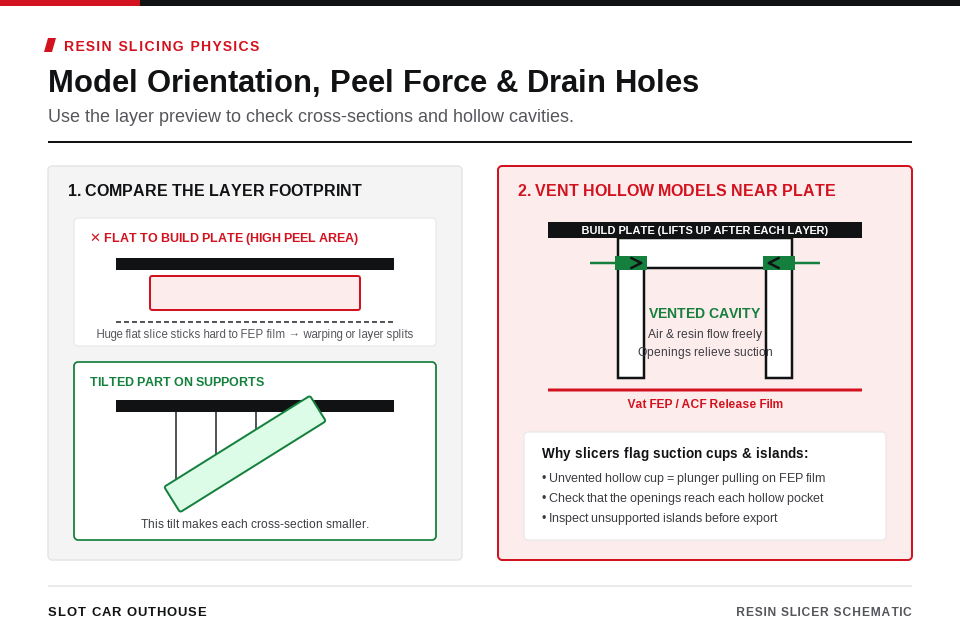
Think of every layer as a tiny tug-of-war: the build plate and supports are pulling the model upward while the release film grips the cured resin downward. A good resin slicer lets you engineer five variables so the build plate wins that tug-of-war on every single layer:
- Part orientation: Printing a large flat base parallel to the build plate creates huge surface area—and huge peel force—all on one layer, often ripping the part off its supports or warping flat edges. Tilting a part can reduce large cross-sections and move support marks to less visible surfaces. Compare angles using the layer preview. (For crisp flat architectural or mechanical faces, advanced slicers also calculate the pixel-grid angle using
arctan(layer height / XY pixel size)to minimize diagonal stepping.) - Hollowing and drain holes: Large solid parts drink expensive resin, create massive peel forces, and generate curing heat. Slicers hollow thick models to a 1.8–2.5 mm wall thickness—but hollowing without drain holes turns your part into a giant rubber plunger. Every time the plate lifts, a closed hollow cavity creates a suction cup vacuum that tears layers apart or leaves uncured liquid resin trapped inside that can crack the finished model weeks later. Placing at least two drain holes near the lowest build-plate-facing end lets air and liquid escape freely.
- Support tips and island anchoring: Resin cannot cure in midair. Any lowest-hanging tip—a sword pommel, an elbow, a slot car mirror—starts as a disconnected dot called an island. If an island has no support beneath it, it cures onto the vat film instead of the model, leaving a flat smudge and floating debris in your tank. Slicers let you place heavy anchor supports on structural low points, medium supports along load-bearing ridges, and fine light tips (0.20–0.30 mm) on delicate details so they peel away cleanly after a warm-water soak.
- Anti-aliasing (AA) and image blur: Because an LCD screen is a grid of rectangular pixels, curved surfaces show subtle microscopic stair-stepping. Anti-aliasing asks the LCD to display intermediate shades of gray along the outer edge pixels, partially curing them to soften voxel lines. Used moderately, AA makes smooth curves and miniatures look injection-molded; pushed too aggressively, it can slightly soften razor-sharp mechanical engravings.
- File format lock-in: Unlike FDM printers that almost universally read plain
.gcode, resin printers use proprietary sliced formats tied to their motherboard vendor—most commonly.ctband.goo(ChiTu Systems boards found in Elegoo, Phrozen, and others),.pwmb/.pws(Anycubic),.prz(some Uniformation/Creality models), or.form(Formlabs). Your slicer must either export your exact printer's format natively or hand off a supported STL to a compatible final slicer.
Top resin 3D printer slicers compared
| Slicer | Best For | Pricing | Native Format Coverage | Standout Strength | Main Trade-off |
|---|---|---|---|---|---|
| Lychee Slicer | Miniatures, hobbyists, everyday workflow | Free (ads) / Pro & Plus subscriptions | Very broad (.ctb, .goo, .pwmb, etc.) |
Community resin profiles, intuitive supports, built-in island detector | Best hollowing/repair tools sit behind subscription |
| Chitubox | Broadest ChiTu-board compatibility & reliability | Basic (Free) / Pro subscription | Broadest native .ctb / .goo support |
Fast, stable, official ChiTu motherboard support | UI feels more utilitarian than Lychee; Pro is subscription-based |
| PrusaSlicer | Open-source auto-orientation, hollowing & pads | 100% Free & Open Source | Native .sl1/.sl1s (STL export for others) |
Cleanest open-source hollowing & tree-style supports | Requires second step (UVtools or native slicer) for non-Prusa printers |
| Elegoo SatelLite / Photon Workshop | Day-1 support for newly launched printers | Free | Brand-specific (.goo/.ctb or .pwmb) |
Immediate profiles for brand-new printer hardware | Fewer advanced support/repair controls than Lychee/Chitubox |
| Formlabs PreForm | Formlabs commercial/prosumer printers | Free (Formlabs hardware only) | Closed (.form only) |
Exceptional automated orientation & printability checks | Locked exclusively to Formlabs printers |
| UVtools | Post-slice inspection & error repair | 100% Free & Open Source | Reads/converts 30+ resin formats | Finds hidden islands, suction cups & resin traps in final files | Companion inspector, not a 3D support-placement slicer |
Lychee Slicer — the miniature and hobbyist favorite
Lychee Slicer (by Mango 3D) has become the default daily driver for tabletop miniature printers, scale modelers, and prop makers. Its interface feels modern and visual, and its Community Resin Profiles library saves beginners hours of guesswork by showing real exposure settings uploaded and upvoted by users running the exact same printer and resin brand.
Lychee's support engine is fast and forgiving: you can run the one-click Magic tool for quick auto-orientation and bracing, or manually place light, medium, and heavy supports with snapping and automatic parent-branch bracing. Its built-in Island Detector highlights unsupported floating pixels before you slice. The free tier is genuinely usable (with brief export ads), while Lychee Pro unlocks pixel-level island editing, hollowing blockers (so hollowing doesn't ruin thin wrists or axles), and advanced mesh repair.
Chitubox (Basic and Pro) — the reliable industry standard
Because ChiTu Systems manufactures the control boards and firmware inside a huge percentage of consumer 3D printers—including most Elegoo and Phrozen machines—Chitubox enjoys rock-solid native compatibility with .ctb and .goo files, including newer firmware features like high-resolution anti-aliasing and rest-after-retract timers.
Chitubox Basic is completely free, fast, ad-free, and handles everyday slicing, hollowing, and manual or automatic supports reliably. Many veteran printers keep Chitubox Basic installed even if they support in another program, simply because it slices large plates rapidly and rarely introduces file-format quirks. Chitubox Pro adds automated mesh repair, multi-parameter slicing (letting you run different exposure settings on different parts of one plate), and stronger island/collision detection on a paid subscription.
PrusaSlicer — open-source powerhouse for prep and hollowing
Even though PrusaSlicer was built natively for Prusa's own SL1S printer, thousands of Elegoo, Anycubic, and Phrozen owners use it as their secret pre-processing tool. It is 100% free, completely ad-free, and open-source.
PrusaSlicer's SLA mode excels at three things: intelligent auto-orientation (optimizing for minimal overhangs and clean faces), remarkably clean hollowing with visual cavity inspection, and sturdy tree-style support structures with chamfered build-plate pads that pop off the plate easily without shattering. The standard hybrid workflow is simple: orient, hollow, drain, and support your model in PrusaSlicer, click Export plate as STL including supports, and drop that ready-to-print STL straight into Chitubox, Lychee, or your manufacturer's slicer for the final two-minute slice.
Manufacturer slicers: Elegoo SatelLite, Photon Workshop, and Formlabs PreForm
Whenever a brand launches a brand-new 12K or 16K LCD printer with a fresh file extension or wireless transfer protocol, third-party slicers sometimes lag by a few weeks. That is where manufacturer slicers earn their keep:
- Elegoo SatelLite: Elegoo's newer dedicated resin slicer offers a cleaner modern workflow than older bundled tools, native Wi-Fi sending for recent Saturn and Mars machines, and solid resin presets.
- Anycubic Photon Workshop: Essential mainly on launch month for newly released Photon printers using updated
.pwmbvariants or cloud transfer. Most experienced Anycubic owners eventually move support placement to Lychee or PrusaSlicer and use Photon Workshop only as a fallback converter if needed. - Formlabs PreForm: In a class of its own, though strictly locked to Formlabs printers. PreForm's automated printability warnings, cupping detection, and validated resin profiles show how seamless a closed hardware-and-software ecosystem can be.
UVtools — the free companion tool every resin printer needs
UVtools is not a slicer where you arrange 3D meshes—it is an open-source microscope for the finished sliced file (.ctb, .goo, .pwmb, .sl1, and dozens more). Load your sliced file into UVtools and run its automated issue scan. Within seconds it flags:
- Floating islands your main slicer missed (and can auto-remove stray 1–3 pixel noise specs).
- Suction cups with exact enclosed area measurements, showing whether your drain holes actually break the vacuum.
- Resin traps—concave pockets that scoop liquid resin upward and spill it out mid-print or cure unevenly.
- Pixel-level exposure tweaks, including wait-before-print (blooming prevention) delays that eliminate rough "elephant's foot" base flares.
Running every large or expensive multi-hour print through a 60-second UVtools check prevents more failed prints and punctured release films than almost any paid slicer upgrade.
Practical decision rules: choosing your resin slicing stack
- Just bought your first Elegoo, Anycubic, or Phrozen printer? Install Lychee Slicer Free to take advantage of community resin profiles and easy visual support placement, plus UVtools for a quick pre-print check.
- Hate ads and subscriptions? Use Chitubox Basic for clean, fast, ad-free slicing, or pair PrusaSlicer (for orientation, hollowing, and supports) with Chitubox Basic or UVtools for final export.
- Printing lots of tabletop miniatures or scale-model parts every week? Lychee Pro pays for itself quickly through faster hollowing blockers, batch island repair, and flexible support presets.
- Printing brand-new hardware that third-party slicers don't recognize yet? Do your orienting and supporting in Lychee or PrusaSlicer, export the supported STL, and run the final slice in Elegoo SatelLite or Anycubic Photon Workshop.
- Using pre-supported STL models? Always verify them anyway—open the final sliced file in UVtools to confirm the sculptor didn't leave an unvented hollow cavity or missed tiny island. For more workshop and hobby setup deep dives, browse our full library of hobby guides.
Sources
Frequently Asked Questions
No. The free versions of Lychee Slicer, Chitubox Basic, PrusaSlicer, and UVtools produce the exact same dimensional accuracy and surface detail as paid tiers. Subscriptions pay for workflow speed—smarter hollowing controls, batch island repair, and convenience tools—not higher print resolution.
Almost always a file-format or firmware mismatch. Verify you selected your exact printer model (and revision, such as Saturn 3 vs Saturn 3 Ultra) inside the slicer so it exports the right extension (.ctb vs .goo vs .pwmb). Also ensure your USB drive is formatted as FAT32, ideally 32 GB or smaller, and keep filenames short without special symbols.
Start conservatively—around 2x to 4x anti-aliasing with light or zero image blur—and test on a familiar miniature or calibration model. Heavy blur washes out fine rivets, panel lines, and facial details, while mild AA smooths curved armor and car bodywork noticeably. Note that a few specific printer/firmware combinations handle AA better in Chitubox's native .ctb format than third-party exports.
Yes. Pre-supported .stl files already have their support geometry baked into the 3D mesh, so you can load them into Lychee, Chitubox, or any native slicer without regenerating supports. Just avoid re-scaling a pre-supported STL dramatically—shrinking it by 50% shrinks the support tips by 50% too, causing failures.
Aim for at least 2.5 mm to 4 mm in diameter and place a minimum of two holes—one as close to the build-plate side of the hollow cavity as possible (to relieve suction on the very first enclosed layers) and a second to allow isopropyl alcohol to flush cleanly during washing. Tiny 1 mm pinholes trap thick resin via surface tension and fail to break vacuum.