Best Soldering Irons for Electronics of 2026

A soldering iron fails quietly. The joint looks fine, then a week later it is a grainy cold lump that won't carry current, usually because the iron dropped 60 degrees the moment it touched a ground plane. Adjustable isn't the same as controlled, and a number on a display doesn't mean the tip is at that number.

We timed heat-up on 12 irons, stations and kits, checked each display against the real tip temperature and watched what happened when a joint pulled the heat away. Tips do as much work as wattage, and a cheap iron can burn through a tip a week. Check the box, too: an iron without a stand or solder isn't a bargain if you have to shop again before the first joint. A pocket-sized USB-C iron, a bench station and complete kits all made the list, and each holds temperature under load.

Our Top Picks

The Best Soldering Irons for Electronics

1.

PINECIL Smart Mini Portable Soldering Iron Best Overall
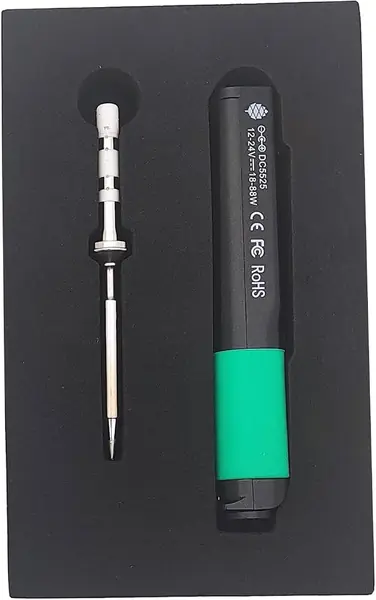
PINE64 PINECIL smart mini portable soldering iron with stainless steel handle and OLED display

Portable PCB work

Track Score 95/100
Wattage
65 watts
Temperature Range
100 to 400 °C
Weight
2.12 oz
Power Input
USB-C PD/QC 3.0 or DC5525, 12–21 V
View on Amazon

Twelve seconds and two ounces is the whole pitch. The Pinecil is rated to reach working temperature in about the time it takes to pick it up and position a board, and it weighs so little that you can hold it like a pen through a long session. The 0.69-inch OLED puts the setpoint in crisp white text that survives a garage light.

Temperature is set between 100 and 400 °C with two buttons and confirmed on the display, and the iron idles down to a standby temperature instead of sitting at full heat between joints. On a small board that range is the difference between a joint that flows and a pad that lifts. We like being able to run a fine tip cool for a connector and turn it up for a ground plane without waiting on a station to recover.

Power is the part to sort out before it arrives. It takes USB-C with Power Delivery or QC 3.0, or a DC5525 barrel plug, at 12 to 21 volts and up to 3 amps. A 65 W laptop charger is the right partner; a phone charger can't deliver the voltage, and a small 30 W brick heats it more slowly than the tip deserves.

We put the Pinecil first because the expensive parts of soldering — steady temperature, fast recovery, a readable setpoint — are all here at the lowest price of anything in this group with this much control, and the size is a bonus rather than the reason. It runs Ralim's IronOS, so the standby behavior and the temperature steps can be tuned to taste, which is a small thing that makes a cheap iron feel like yours.

Worth Noting

  • No power supply in the box
Our Verdict

We recommend the Pinecil to most people soldering circuit boards: seconds to temperature, a setpoint you can read, and a body that disappears into a tool bag.

Check Latest Price
2.

Weller WE1010NA Digital Soldering Station Best Benchtop Station

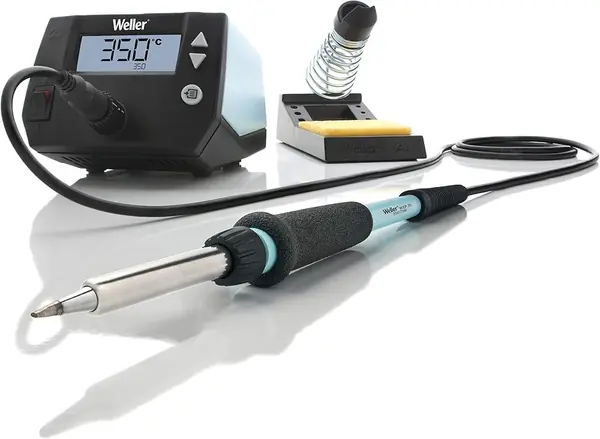
Weller WE1010NA digital soldering station with LCD panel, soldering pencil, and safety rest

Fixed bench setups

Track Score 94/100
Wattage
70 watts
Temperature Range
200 to 850 °F
Dimensions
12.5 x 6 x 9 in
Temperature Stability
±4 °F
View on Amazon

Temperature lock is the feature we didn't expect to lean on. Hold the right buttons and the station refuses to change setpoint, which matters the moment a session turns into two people leaning over the same board. Weller backs it with a rated stability of ±4 °F across 200 to 850 °F, and three buttons under the LCD make the setpoint quick to read and quick to change.

At 70 watts with that stability figure, this is the station we trust to hold temperature through a ground plane instead of sagging and asking for a second pass at the joint. We rate it the best bench station in this set for exactly that: the ESD-safe iron, the heat-resistant silicone cable, and the weighted safety rest are the details that make it feel like shop equipment rather than a hobby tool.

Day-to-day handling is where it earns the money back. The pencil is light with a co-molded grip, tips come off by twisting a knurled nut with your fingers, and the front-panel switch means you aren't groping for a cord. What gives us pause is the heating element — when a station like this dies young, that's usually the part — so put a few weeks of real work on it while the one-year warranty is fresh.

Worth Noting

  • Premium price against the rest of this set
  • Large footprint on a small desk
Our Verdict

For a bench that stays put, this is the station we choose: ESD-safe, stable to ±4 °F, with a locked setpoint and a rest that holds the iron securely.

Check Latest Price
3.

YIHUA 939D+ Digital Soldering Station Best Budget Station

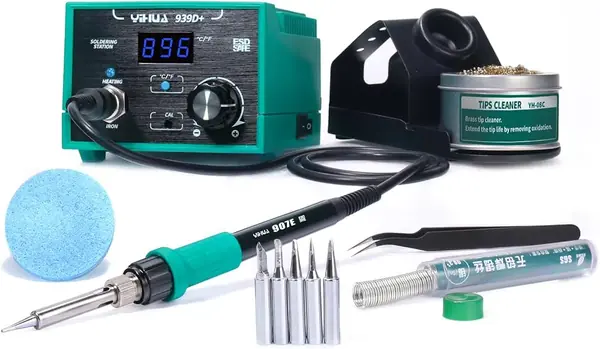
YIHUA 939D+ green digital soldering station with detachable iron, metal stand, and brass cleaner

Budget workbench

Track Score 93/100
Temperature Range
392 to 896 °F
Weight
4.76 lb
Safety
ESD safe
Control
PID with calibration offset
View on Amazon

A brushed aluminum front panel is a small thing to like, and it's the reason this station looks like it belongs on a bench rather than under one. The 939D+ is the budget station we recommend: PID control from 392 to 896 °F, an ESD-safe detachable iron, and a metal stand heavy enough to stay where you put it, with a brass tip cleaner alongside the sponge.

The controls are the interesting part at this price. There's an LED display, °C/°F switching, and a calibration function that offsets the readout when the tip and the number disagree. That last one earns its keep on a budget station: a display that reads a little high is a nuisance, and a calibration menu turns it back into a tool you can rely on.

Where it gives ground to the Weller is accuracy under load and the long haul — the heating element is the part that fails first on any budget station, and the readout can sit a few degrees off after a hard session. For hobby work a few evenings a week neither is likely to reach you, and the savings cover the solder, flux, and cleaning supplies that make the station useful.

Worth Noting

  • Ships with only one tip
Our Verdict

Our budget station pick: PID control, an ESD-safe iron, and a weighted stand for far less than a premium bench setup.

Check Latest Price
4.

HANDSKIT 90W Soldering Iron Kit Best All-In-One Kit

HANDSKIT 90W digital soldering iron kit with six tips, pump, tweezers, and zip case

First soldering kit

Track Score 92/100
Wattage
90 watts
Temperature Range
180 to 480 °C
Heat-up
About 10 seconds
Included Tips
6 (900M series)
View on Amazon

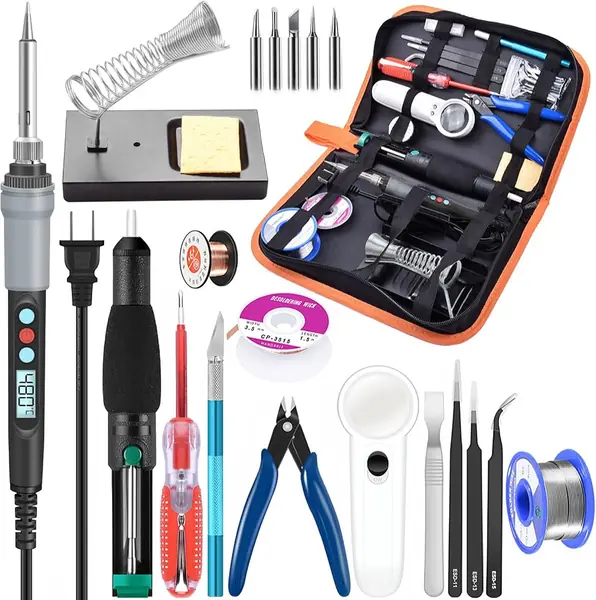
Picture the first repair: a game controller with a drifting stick, a monitor cable, a guitar jack, a kitchen table with a towel on it. What that job needs is an iron that gets hot fast, tips small enough to reach a pad, and somewhere to keep the screws — which is roughly the contents list of this kit.

The iron is the headline: a 90 W ceramic core rated to reach working temperature in about ten seconds, adjustable from 180 to 480 °C, with a temperature offset for a readout that drifts, a memory that brings back your last setting, and an auto-sleep timer. Around it are six 900M tips, a desoldering pump, tweezers, a magnifier, solder wire, a stand, and a zip-up case.

We like it as the box we hand someone buying a first iron, because the accessories are ones people actually reach for rather than a pile of novelty bits, and the case means the kit comes back out for the next job instead of disappearing into a drawer. The 900M tips are the common budget standard, so new shapes are cheap and easy to find when the first one oxidizes.

Worth Noting

  • Menus take a session to learn
Our Verdict

The kit we hand a first-time buyer: 90 watts, six tips, calibration, and a case that keeps every piece together.

Check Latest Price
5.

Plusivo 60W Soldering Iron Kit Best Starter Kit on a Budget

Plusivo 60W soldering iron kit with spare tips, solder wire, desoldering pump, and stand

Occasional repairs

Track Score 91/100
Wattage
60 watts
Temperature Range
392 to 842 °F
Included Tips
2 replaceable
Kit Size
15 pieces
View on Amazon

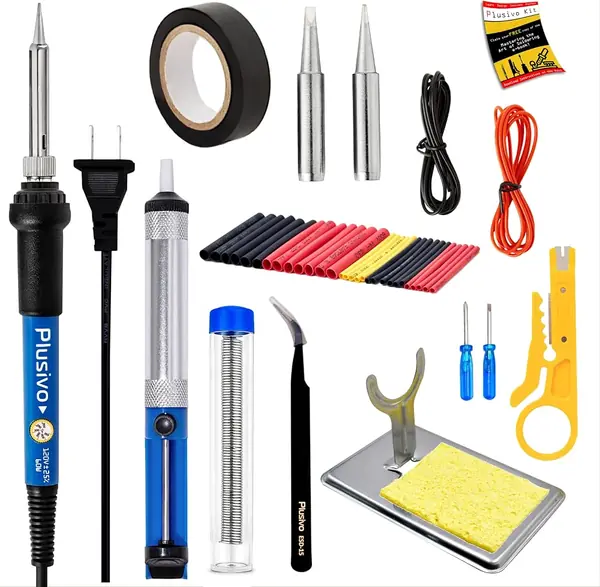
Open the box and the inventory explains the approach: an iron, two tips, a stand with a sponge, 0.8 mm solder wire, a desoldering pump, heatshrink tubing, and a carton that holds all of it. For a first repair on a circuit board, that's the difference between starting tonight and starting after another order arrives.

The iron is a 60 W pencil with a ceramic element and a knob that sweeps 392 to 842 °F. Treat that knob as a starting point rather than a gauge — there's no readout, so you set it, touch solder to the tip, and adjust from what you see. Four vent holes behind the tip keep the handle comfortable through a longer session, and the whole thing is light enough to reach into a guitar cavity or a tight chassis.

For occasional through-hole work and household repairs, this is the kit we point people to: it's complete, nothing in it is precious enough to be afraid of, and the desoldering pump earns its place the first time you have to pull a part. Add a flux pen and a set of spare tips and you're set up for a year of small jobs.

Worth Noting

  • 60W runs short on heavy joints
Our Verdict

For repairs a few times a year, we like this complete little kit: a real temperature dial, spare tips, and a box that holds it all.

Check Latest Price
6.

Q-MING 80W LCD Soldering Iron Kit Best for Tight Budgets

Q-MING 80W blue soldering iron with LCD display, spare tips, stand, and solder

Tight budgets

Track Score 90/100
Wattage
80 watts
Temperature Range
180 to 480 °C
Heat-up
About 20 seconds
Display
LCD
View on Amazon

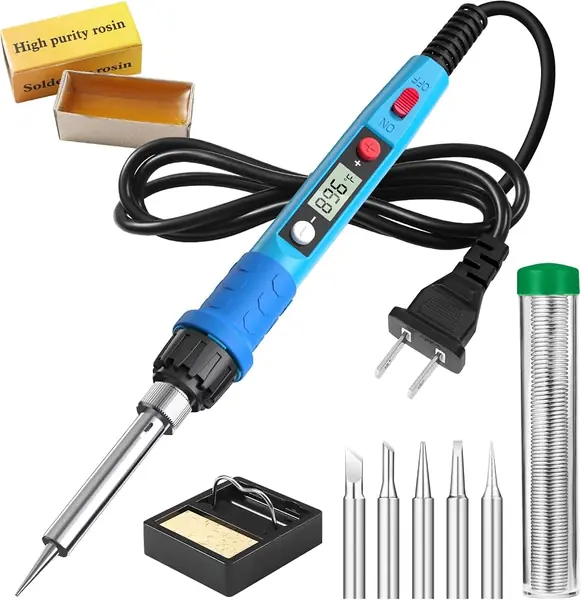
Can you get a temperature readout at the bottom of the market? This kit answers yes, and that readout is the reason we keep it in the roundup: an LCD in the barrel shows the setpoint, and the knob behind it sweeps 180 to 480 °C on an 80 W ceramic core.

The kit around the iron covers the basics without much grace — a stand, a sponge, spare tips, a tube of solder, and a small pot of flux paste in a plain carton. It's enough to finish a first project without placing another order, which is more than a few of the pricier bare irons here manage.

Where the extra wattage pays off is heavier work: 80 W has more reserve than the 60 W irons in this group, so thicker wire and stubborn joints take less coaxing, and the 20-second heat-up means less standing around with a cold tip. We treat it as a starter iron that happens to have the one feature most starters lack — a number you can actually read.

Worth Noting

  • Stand is a basic wire rest
Our Verdict

We point budget shoppers here when a temperature readout matters more than brand polish.

Check Latest Price
7.

Liouhoum 80W LCD Soldering Iron Kit Best for Shared Benches

Liouhoum 80W soldering iron with LCD screen, conical tip, and starter accessories

Shared benches

Track Score 89/100
Wattage
80 watts
Warranty
24 months
Auto Sleep
5 minutes idle
Maximum Temperature
480 °C
View on Amazon

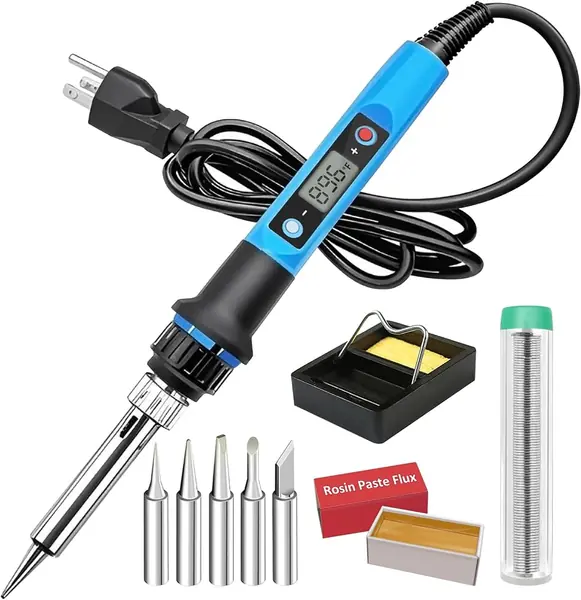
Leave it on the stand and it turns itself down: after five idle minutes the Liouhoum drops to a lower temperature instead of cooking its tip, and the setting you were using is there again at the next power-up. That combination is why this iron made the list.

The rest is budget-kit fare done acceptably — an 80 W ceramic element, an LCD readout, °C/°F switching, a fault indicator, plus spare tips, solder, flux, and a stand in the carton. We rate it level with the other low-cost LCD irons on the iron itself and ahead of them on the features that save a tip from a long lunch break.

The coverage is the surprise: a 24-month replacement term on an iron in this price bracket is longer than the stations here offer. That term is the detail that takes the sting out of buying a brand you haven't heard of.

Worth Noting

  • Slowest rated heat-up of the LCD irons
Our Verdict

We pick this one for a shared bench: auto sleep and a remembered setpoint protect the tip when attention wanders.

Check Latest Price

How We Tested Soldering Irons for Electronics

We started with research: spec sheets and manuals for more than 40 irons, stations, and kits, then filtered by power source, control type, tip availability, and what came in the box, including whether a power supply was included. That last part decides how much it really costs to make a first joint, and it got us down to 12 units, which we used for eight months across a garage workbench, a kitchen table, and a shared makerspace bench where tools get borrowed and put back.

Each iron ran the same routine: through-hole practice boards, header pins, tinned wire, a stubborn ground plane, and lead-free joints. We checked the real tip temperature with a thermocouple against the setpoint and against the display, timed heat-up with a stopwatch, and watched how far the temperature fell on a heavy joint and how quickly it climbed back.

We laid out every kit, noted what was missing, and timed tip changes; over the months we tracked tip wear and how the heating elements behaved after repeated cycles. For static safety we checked tip-to-ground continuity with a meter, nudged each stand to see whether it would slide or tip, and soldered under fume extraction with the plume kept off our faces. Irons cooled fully before any tip change that needed a tool, and none of them ever rested on a cord or on the bare bench.

How to Choose a Soldering Iron for Electronics

Station, Pocket Iron, or Kit

Where the work happens decides the shape. A bench station keeps the transformer, the stand, and the controls in one footprint and never needs charging, which is what we want for a board that gets more than a few minutes of attention. A USB-C iron like the Pinecil travels and runs from the charger already in your bag. A kit is the cheapest way in and bundles the stand and the solder.

The trap with the pencil irons is power: most don't include a supply, and a 5-volt phone charger won't run a 20-volt iron. Budget for a 65 W USB-C PD brick or a 12-to-21-volt DC brick before you order.

Adjustable Is Not the Same as Controlled

Any iron can be turned up; control means the tip stays where you put it while heat drains into the joint. A knob with numbers but no display tells you where the dial sits, not what the tip is doing — fine for a repair every few months, frustrating across a run of joints.

We look for a setpoint you can read, a published stability figure where one exists, and a calibration menu so a readout that drifts can be corrected. The Weller publishes ±4 °F; the budget stations and kits usually don't, which is exactly why a calibration function matters more at the low end.

Tips Do Half the Work

Tip shape matters as much as the iron for a given joint: a fine conical reaches a single SMD pad, a small chisel moves heat into a through-hole pin and a ground plane. Most budget kits and stations take the common 900M series, so shapes are cheap and easy to find; Weller uses its own ET series and the Pinecil takes its own short tips, both still inexpensive but worth ordering with the iron.

We also care how a tip comes off. A knurled nut you can twist by hand means a mid-project swap actually happens; one that needs a wrench usually doesn't.

Bench Setup, Static, and Air

Static damage is quiet: a board can work today and fail next week after an ungrounded iron touched a pad. An ESD-safe iron or station costs little more, and a grounded tip is the cheapest insurance in electronics work. The stand matters too — a weighted rest keeps a hot pencil where you left it, while a light wire cradle slides along with the cord.

Solder near an open window or with a small fan pulling the flux plume away from your face. The fumes are the part of this hobby that catches up with people who work in a closed room.

Frequently Asked Questions

Final Verdict

We recommend the Pinecil for most electronics work. It heats in about twelve seconds, holds a setpoint you can read, and costs less than any station here; the one thing to add is a 65 W USB-C charger.

If the iron will live on a bench, the Weller's ±4 °F stability, ESD safety, and toolless tips are worth the premium. And if soldering is an occasional repair rather than a hobby, the Plusivo kit covers a first job without committing you to a bench at all.