Best USB-C Soldering Irons of 2026

Bench irons tend to live in one spot, tethered to the wall by a cord that is always in the way. A USB-C iron is a marker-sized pencil that heats in seconds and runs off the brick that charges your laptop, which puts a temperature-controlled tip on the kitchen table, in the garage or on someone else's workbench without a station in tow. The box specs don't say how it behaves in your hand.

Wattage is half the story. A 100-watt iron plugged into a 45-watt laptop charger becomes a different tool, and a good tip recovers heat faster than a bigger element does. Three-second heat-up claims usually mean three seconds to a working temperature, not to the number on the display, which 14 irons on the bench confirmed again and again. Some of the eight picks want a proper supply; others are battery models that live in a tool bag.

Our Top Picks

The Best USB-C Soldering Irons

1.

Pinecil Smart Mini Portable Soldering Iron Best Overall
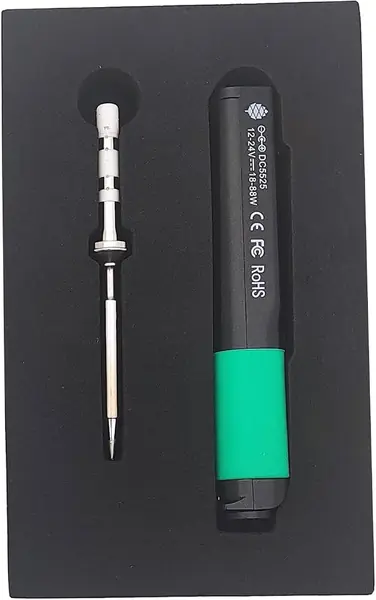
PINE64 Pinecil smart mini portable soldering iron with stainless steel handle and OLED display

Bench electronics work

Track Score 92/100
Temperature Range
100 °C to 400 °C
Heating Time
About 12 seconds to working temperature
Power Input
USB-C PD/QC 3.0 at 12V or 20V, plus DC5525 barrel jack
Display
0.69-inch OLED running IronOS
View on Amazon

Sixty-five watts through a USB-C port is the whole argument. The Pinecil draws PD or QC 3.0 at 12V or 20V, up to 3A, and there's also a DC5525 barrel jack for an old bench supply. In the box you get the iron and a tip, nothing else — no charger, no stand — which is why the number on the tag looks so much smaller than the kits here.

We used it for header pins, small wire, and a couple of controller repairs, and what struck us is how little waiting there is. It reaches a working temperature in about the time it takes to unwind a length of solder, and the OLED holds whatever you set between 100 °C and 400 °C, so a fine pad and a chunky connector are a few button presses apart.

Feed it properly and it behaves. A 20W phone brick leaves the recovery between joints sluggish; a 60W-class laptop supply, or any PD brick that offers 20V, is the right pairing, and the barrel jack takes a bench supply if you have one. Buy it somewhere with a generous return window and check it thoroughly in the first week.

The tip ecosystem is what settles it for us. It shares tips with the TS100 line, so fine points and broad chisels are cheap and easy to find, and a swap is a pull and a push. A fast iron with a supply you already own and tips you can replace is, for most hobbyists, the end of the search.

Worth Noting

  • Some irons fail within weeks
Our Verdict

We point anyone who already owns a 65W laptop brick to the Pinecil: quick heat, honest temperature control, and one of the lowest prices in this group.

Check Latest Price
2.

TS101 Soldering Iron Kit Best Complete Kit

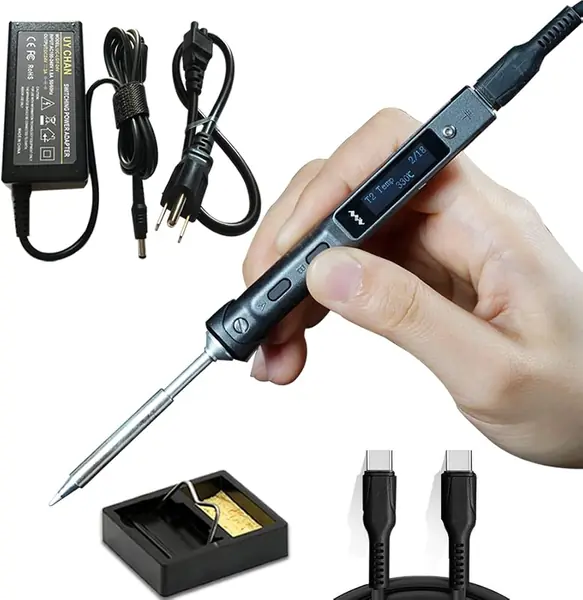
UY CHAN TS101 portable soldering pen kit with B2 tip, stand, and DC power supply

Bench and field

Track Score 91/100
In The Box
Iron, TS-B2 tip, 24V supply, C-to-C cable, stand
Weight
3.53 oz
Power Input
DC 9–24V (65W) or USB-C PD (45W)
Max Temperature
400 °C
View on Amazon

Everything needed for a first joint comes in the box: the iron, a TS-B2 tip, a 24V wall supply, a silicone C-to-C cable, and a stand. That sounds minor until you add up the alternative — a bare iron plus a charger plus something to rest it on — and realize the kit is the cheaper route to a working bench.

The iron runs from DC 9–24V at up to 65W or from USB-C PD, and it adds a Boost function that dumps extra heat into the joint for a few seconds, enough to finish a connector shell instead of stalling the tip. Dual temperature sensors, gravity sleep, an overheat warning, and firmware you can edit from a computer round it out.

In hand it's a slim 3.53 oz pen, and the anti-slip cap doubles as a finger grip and a tip wrench. We liked the stand more than we expected to: it holds the iron at an angle instead of letting it roll, which matters when you're moving between a board and a meter and setting the iron down every 30 seconds.

Against the Pinecil, this is the kit we hand to someone with no bench and no spare chargers — the whole cost lands in one order and everything matches. The boost function covers the occasional heavy joint, and nothing in the box needs upgrading on day one.

Worth Noting

  • USB-C PD input is capped at 45W
  • Menu system takes time to learn
Our Verdict

Open one box and start soldering: the TS101 kit includes the iron, a tip, a 24V supply, a USB-C cable, and a stand, and it uses the full 65W on that supply.

Check Latest Price
3.

FNIRSI HS-02A Soldering Pen Most Power

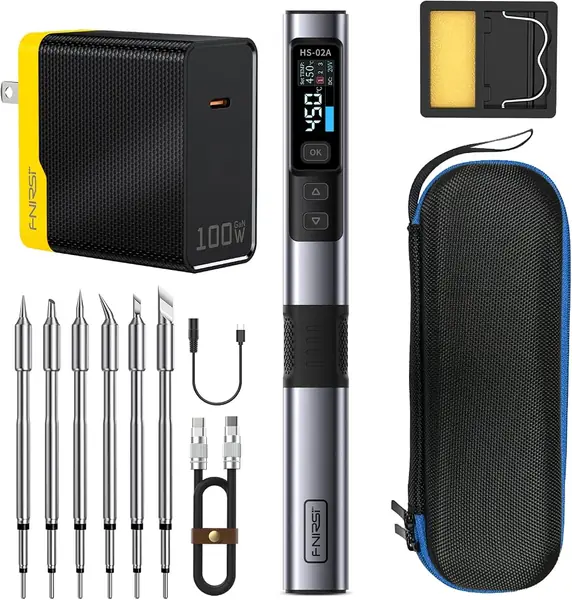
FNIRSI HS-02A portable soldering pen with six F245 tips and a 100W PD adapter

Heavy joints

Track Score 88/100
Temperature Range
212–842 °F (100–450 °C)
In The Box
100W PD adapter, six F245 tips, stand
Weight
2.15 oz
Max Power
100W over USB-C PD
View on Amazon

A hundred watts through a USB-C cable puts the HS-02A in a different class from the pen irons here. It's corded only — no cell inside, no compromise on output — and it ships with the 100W PD adapter it needs, which removes the charger guessing that comes with the bare irons.

We pointed it at the jobs the small irons complain about: a chunky connector, a wire splice, a pad tied to a ground plane. The difference shows up as recovery. The tip comes back to temperature between joints instead of sagging, and the 3-second heat-up means you stop scheduling around warm-up. The six F245 tips in the box (K, KU, JS, I, C2, B) cover everything from a fine pad to a fat chisel, three saved presets switch temperatures with one press, and a calibration routine corrects a tip that reads a little off.

It's a bench tool. With no battery you need an outlet or a PD power bank that can hold voltage under load, and if the supply can't keep up the iron complains — FNIRSI builds in an adaptive power mode and a manual voltage setting for exactly that. The display is small, the deeper settings sit behind a long press, and the handle is plain rubber over light plastic. None of that matters once the joint is hot, which is the point.

Worth Noting

  • Some units die with no warning
  • No battery, so an outlet is required
Our Verdict

When a joint needs real heat, choose the HS-02A: 100W over USB-C PD, a matching adapter in the box, and 61 g of soldering pen in your hand.

Check Latest Price
4.

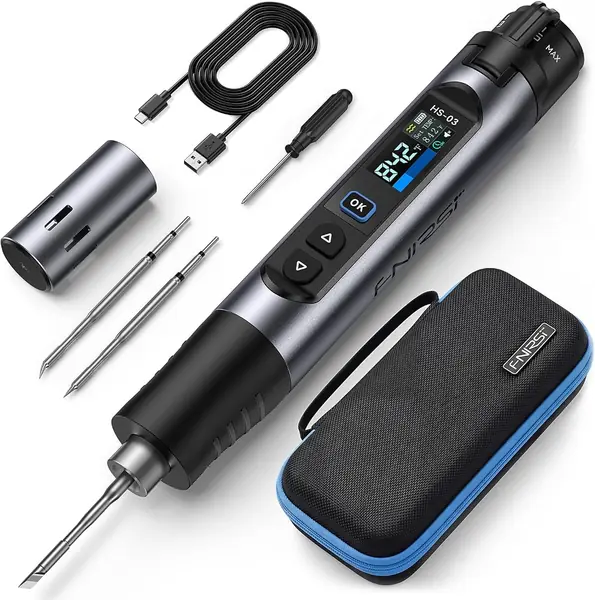
FNIRSI HS-03 Cordless Soldering Iron Best Cordless

FNIRSI HS-03 cordless soldering iron kit with silicone grip and IPS color screen

Cordless repairs

Track Score 87/100
Battery
2,600mAh, USB-C charging
Temperature Range
212–842 °F
Heating Time
About 3 seconds
Tips
Three tool-free tips (K, I, IS)
View on Amazon

The HS-03 won us over on controls. A knob on the tail jumps between five preset temperatures, the buttons handle fine adjustment in small steps, and the 0.96-inch IPS screen can be flipped so it reads right side up whether you hold the iron in your left hand or your right — a detail nothing else here bothers with.

Heat arrives in about three seconds, which changes how you work: you pick it up, solder, and set it down instead of leaving it idling. The 2,600mAh cell runs it cordless, and a USB-C cable lets you keep soldering while it charges — the mode we ended up using most, because an iron tethered to a power bank still beats walking to an outlet.

Tip changes are tool-free, and the three you get cover most of it: K for joints, I for precision, IS for tight spaces. What you give up is muscle. A battery-powered tip can't pour heat into a big connector the way the corded 100W iron can, so treat this as a precision tool and let the heavy joints wait for a bench session.

Worth Noting

  • Slow to fully recharge
Our Verdict

For work inside a car, a cabinet, or a case, the HS-03 is the cordless iron we hand over: instant heat, a thumb knob, and a screen that flips for left-handed users.

Check Latest Price
5.

Iroda SolderPro 25LK Best for Low-Light Work

Iroda SolderPro 25LK battery soldering iron with three tips, LED light, and case

Field repairs

Track Score 86/100
Battery
3,200mAh, USB-C rechargeable
Max Temperature
500 °C (932 °F)
Heat-up
8 seconds to 270 °C
Runtime
45 minutes continuous or about 1,100 joints
View on Amazon

A spotlight built into the barrel sounds like a gimmick until you're leaning into a wheel well at dusk. The LED points where the tip points, and the whole kit lives in a hard case with a slot for each tip, a tube of solder, and a wire sponge — the only iron here that arrives ready to be thrown behind a truck seat.

On paper it's the most conservative iron in this group: 30W, 8 seconds to 270 °C, a 500 °C ceiling, and a claimed 45 minutes of continuous soldering or about 1,100 joints from the 3,200mAh cell, which recharges over USB-C. What the numbers don't convey is the grip — a fat, rubberized handle that stays comfortable when you're holding it upside down over your head.

We keep it for jobs where a bench is impossible rather than for fine board work, and the 30W rating shows up in cool air on thick wire, where it holds temperature less confidently than the corded irons. For an occasional repair in a driveway, that trade is easy to accept — the light and the case earn their space in the bag.

Worth Noting

  • Spare tips are hard to source
Our Verdict

The SolderPro is our pick for engine bays and dim corners: a built-in LED, a 3,200mAh battery, and a hard case that keeps three tips and solder together.

Check Latest Price
6.

Larlarsa Cordless Soldering Pen Best for Occasional Repairs

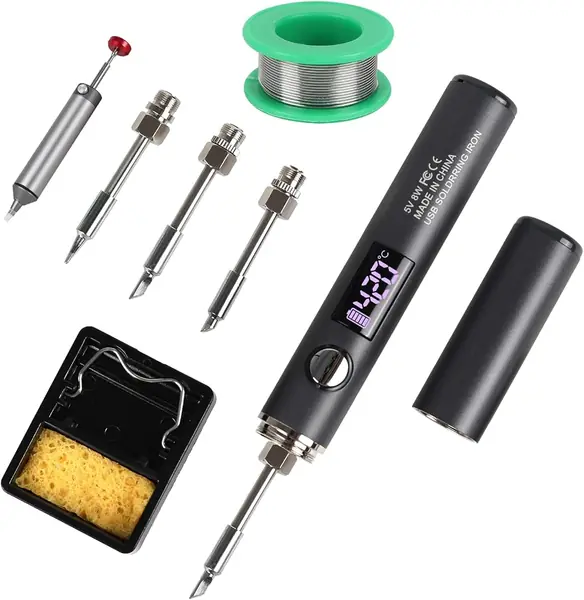
Larlarsa cordless soldering pen with OLED screen, three tips, and lead-free solder

Occasional repairs

Track Score 85/100
Battery
1,400mAh, USB-C PD charging
Temperature Range
260–420 °C (500–788 °F)
Power
8W
In The Box
Three tips and lead-free solder wire
View on Amazon

If your soldering is a repair every few months rather than a weekly session, this is the sensible spend. The Larlarsa is an 8W pen with a 1,400mAh cell, and it handles the small stuff neatly: it's at temperature in seconds, the OLED shows the set point and toggles between °C and °F, and the 260–420 °C range covers everything from a fine pad to a speaker terminal.

The kit answers the beginner's second question — what else do I need? Three tips and a tube of lead-free solder come with it, which is more than the bare irons here give you. Charging is over USB-C PD from a wall adapter, a laptop, or a power bank, and the 10-minute auto-sleep stops it cooking its own tip when you set it down mid-job.

Eight watts is the honest limit. It will do pads, header pins, and light wire, and it will struggle with anything that sinks heat: battery leads, ground planes, thick splices. At 5.75 inches and 4.41 oz it steers like a marker rather than a tool, which makes fiddly work easier than it has any right to be.

Worth Noting

  • Small battery limits long sessions
Our Verdict

Buy the Larlarsa as a glovebox iron: it heats fast, holds a set temperature on an OLED, recharges over USB-C, and comes with tips and lead-free solder.

Check Latest Price
7.

ANBES Cordless Soldering Iron Kit

ANBES cordless soldering iron kit with LCD screen, three C210 tips, and charging stand

Beginner desk setup

Track Score 84/100
Battery
18,000mAh built-in
Heating Time
About 3 seconds
Power
30W on battery, 75W over PD
Charging
USB-C or the wireless stand
View on Amazon

Eighteen thousand milliamp-hours in a soldering iron is an unusual amount of battery, and it changes the shape of the tool: this is a base you lift the iron off, not a pen you carry in a pocket. The stand doubles as a wireless charger, so the iron tops up between joints without a cable to think about.

It heats in about three seconds, holds a temperature set on the LCD, and lights the work with an LED at the tip — genuinely useful under a dashboard. Three C210 tips (I, IS, K) cover fine pads and small connectors, a gravity sensor puts it to sleep when you set it down, and the silicone sleeve keeps the handle cool through a longer session. On a cable it pulls up to 75W over PD; on battery it's limited to 30W.

That 30W ceiling sets expectations: it's fine for board work and light wire and it will not keep up with a heavy connector the way the corded picks do. We also found the heat wandering a little at the top of its range, so practice on scrap before you commit a board. What we liked most is how the whole thing lives in one place — the base sits flat and the iron lifts out one-handed, which is more than we can say for a loose pen and a coiled cord.

Worth Noting

  • Base-station shape is not pocketable
Our Verdict

The ANBES kit makes sense for a beginner who wants everything at once: a large battery iron, three tips, an LCD, and a stand that recharges it.

Check Latest Price
8.

Beizkna 14-in-1 Cordless Soldering Iron Kit

Beizkna 14-in-1 cordless soldering iron kit in grey with tips, tweezers, and tool box

Occasional DIY

Track Score 83/100
Battery
3,200mAh
Temperature Range
392–932 °F (200–500 °C)
Heating Time
About 5 seconds
Power
12W on battery
View on Amazon

Fourteen pieces for the price of a mid-range iron is the pitch, and the box delivers: the iron, three C210 tips, tweezers, a desoldering pump, a stand, 20 g of solder wire, a USB-C cable, and a tool box. If you own no soldering gear at all, that list is the fastest route to a working bench.

The iron runs cordless from a 3,200mAh cell or tethered over USB-C, heats in about five seconds, and covers 392–932 °F in 5 °C steps on a large LED display. A gravity sensor drops it into sleep after 30 seconds of stillness and the iron shuts itself off after 10 minutes — the sort of habit you want in a tool that gets set down mid-job.

On battery it's a 12W iron, and the runtime figure assumes you're at the top of the range, so what you get is a useful session rather than an afternoon. Wired it's stronger, and a cable on the bench makes anything more than a few joints easier.

What you're buying is completeness: a pump and tweezers that usually cost extra, in a molded case that keeps tips from disappearing into a drawer. For a first kit handling a couple of jobs a year, that's a reasonable bet — just don't expect it to feel like the pricier irons here when you pick it up.

Worth Noting

  • Heat can sag on longer joints
  • Some units fail within weeks
Our Verdict

It's the most complete budget kit here — 14 pieces, a 3,200mAh battery, and 5-second heat — for buyers who solder a few times a year, not every weekend.

Check Latest Price

How We Tested the Best USB-C Soldering Irons

We began with spec sheets for more than 40 irons, then filtered for a USB-C PD input, a documented tip family with spares, and a real temperature readout instead of a three-LED guess. Fourteen made it to the bench for eight months. Each one soldered the same work: through-hole joints on practice boards, spliced wires for a bench light, a capacitor swap on a dead monitor, and a guitar cable. A few went into a tool bag for weekend repairs, tip cooled and capped first.

From cold, we timed every iron to a working 660 °F with a stopwatch, then again after a 30-second pause to see how far the tip sagged and how fast it recovered. We measured what each drew from a 65-watt and a 100-watt PD charger, since an iron that can't pull the voltage it wants solders like a cheaper tool. Cordless models ran 20 joints on a full charge, then recharged on a bare steel bench rather than a pile of rags. Every board was unplugged before we touched it; none of these irons is rated for live-circuit work.

Temperature control we judged by checking the display against a thermocouple, running every preset, and leaving an iron idle for 10 minutes to see whether sleep and shutoff fired. We fitted each tip in every kit, swapped them cold, and counted the spares in the box against the ones we'd have to buy. Ease of use and value came down to small things: whether the stand held the iron steady, whether the menu made sense without the manual, and whether the kit justified its price once you counted the charger, tips, and case. At the end, tip erosion, frayed cables, and whether the case still closed told us how each one held up.

How to Choose a USB-C Soldering Iron

Match the Iron to the Charger You Own

USB-C on the box does not guarantee 65W. A PD charger has to offer the voltage the iron asks for, usually 20V, and a phone brick that tops out at 5V or 9V leaves a 65W iron running at a fraction of its output. Look for 20V/3.25A on the charger's spec line before you blame the tool.

Some irons include the supply and some do not. If you already own a 60W-plus laptop brick, a bare iron is the better value; if you do not, a kit that ships with a 24V supply or a 100W PD adapter saves a second order and a week of guessing.

Decide Whether You Need Battery Power

A cordless iron is the right answer for work in a car, a ceiling, or a rack — anywhere an outlet is a walk away. The catch is output: the wattage on the box is often the PD figure, while the battery itself delivers much less, roughly 12W to 30W on the models here. That is plenty for pads, header pins, and light wire and not enough for a battery lead or a ground plane.

Runtime claims are usually measured at maximum temperature, so treat 45 to 60 minutes as a ceiling rather than an average. If your soldering happens at a bench, a corded PD iron gives you more heat for less money.

Read Tips and Temperature Control Together

The tip is the part that touches the work, and a broad chisel moves heat into a joint that a fine point cannot. Check which tip family the iron uses and whether spares are easy to find; a good iron with no replacement tips is a disposable tool.

On the control side, a display and saved presets matter more than they sound once you are switching between a fine pad and a connector. Calibration, gravity sleep, and an automatic shutoff are worth having — they protect the tip and the bench.

Think About Size, Stands, and Travel

Most of these are soldering pens weighing between 2 and 5 ounces, so the difference you feel is the handle shape and whether there is a cap. A locking cap is the difference between tossing an iron into a tool bag and wrapping it in a rag.

A stand matters too. A pen-style iron rolls, and a hot one rolling off a bench is a quick way to lose a tip or scar a tabletop. A foldable stand or a weighted base is worth the bulk if the iron lives on a desk.

Frequently Asked Questions

Final Verdict

The Pinecil is the iron we recommend to most people, and the reason is simple: it does the job on a charger you probably already own, and it does it for less than the kits. Pair it with a 65W PD brick and a couple of extra tips and you are set for years of board work.

If you have no suitable charger, the TS101 kit removes that problem in one purchase and adds a boost function besides. If your soldering runs to thick wire and ground planes, the 100W FNIRSI HS-02A is the one that will not leave you waiting on heat.