PINE64 Pinecil Best Overall
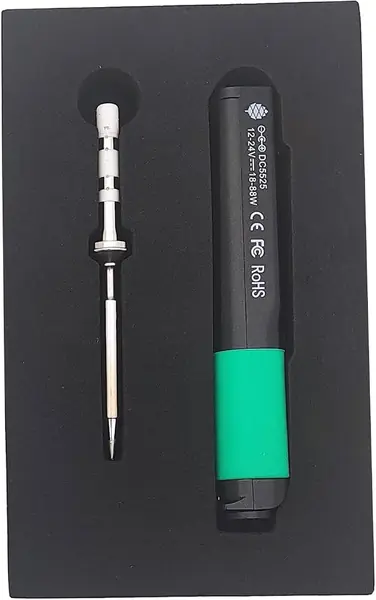
- Weight
- 2.12 oz
- Heat-up Time
- 12 seconds
- Display
- 0.69-inch OLED
- Power Input
- USB-C PD/QC 3.0 and DC5525
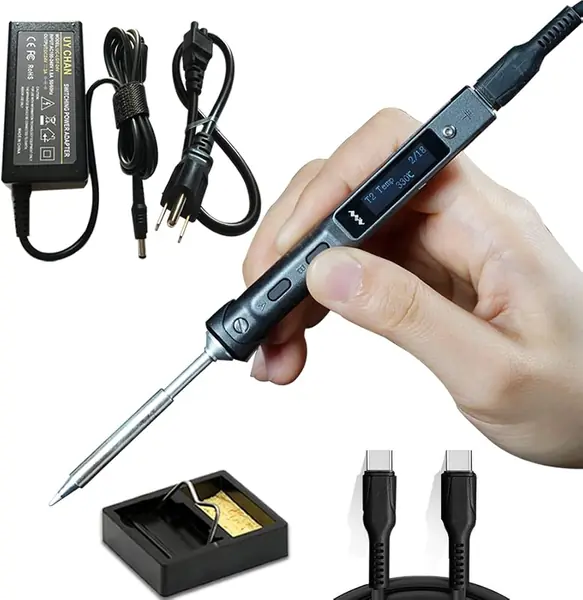
The first thing we noticed about the Pinecil is how little room it takes up: at 2.12 ounces and 6.1 inches long, it disappears into a tool roll next to a multimeter. The 65-watt element reaches operating temperature in about 12 seconds, and the 0.69-inch OLED gives you a readable setpoint without a phone app. We also like that it accepts both USB-C PD/QC and a DC5525 barrel feed, so the same soldering pen can run from a laptop-class brick, a power bank, or a field battery with the right adapter.
The temperature range runs from 100°C to 400°C, and the two-button interface is simple enough to adjust with gloves off. Because it runs IronOS, you can dig into standby timers, boost behavior, and custom menus if you want; we mostly left it in the simple mode and appreciated the auto-standby when we set it down between joints. The tip is replaceable, and the barrel is slim enough to work around crowded boards.
What makes the Pinecil our top pick is the balance of heat, size, and power flexibility. It is not the most complete kit here, since the TS101 includes a supply and stand, but it wins when the bag is already full. Pair it with a 65-watt PD source or a DC pack that can deliver 12 to 20 volts at 3 amps; a basic phone charger will not cut it. For board work, RC connectors, and track-side repairs where you already carry power, it is the default we recommend.
What We Like
- Heats in about 12 seconds from cold
- Runs from USB-C PD or DC power
- Weighs just 2.12 ounces for packing
Worth Noting
- Power supply not included
We recommend the Pinecil to most people because it packs 65W of heat into an 88-gram pen that runs from the USB-C brick or battery pack you already carry.
Check Latest Price