Best Soldering Irons for Heat-Set Inserts of 2026

A heat-set insert is a small brass barrel you sink into a 3D-printed hole with a hot tip: the plastic softens, flows into the knurling and locks the threads in place. Get the temperature wrong or use a tip that doesn't seat flat, and you get a crooked insert sunk below flush, usually because of the iron rather than the inserts.

A good iron holds temperature for the ten seconds an insert takes to seat and carries a tip sized to the insert instead of a generic cone. The wattage on the box told us almost nothing; heat recovery between inserts did, across 12 irons pressing inserts into PLA, PETG and ABS. Much of a kit's value also sits in the small parts: an M8 tip when you need one, a stand that stays put when the cord tugs and a sleep mode that actually drops the heat.

Our Top Picks

The Best Soldering Irons for Heat-Set Inserts

1.

3DZWMAN Heat Set Insert Kit Best Overall
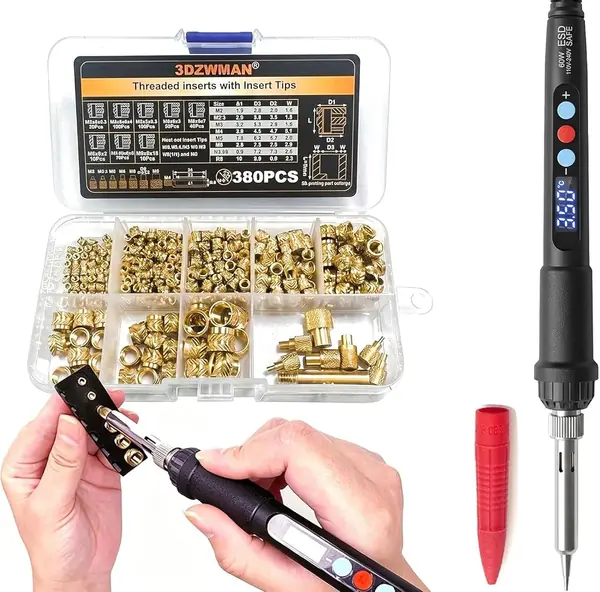
3DZWMAN heat-set insert kit with 60W digital soldering iron and brass inserts

Complete insert kits

Track Score 91/100
Power
60W
Temperature Range
180–500°C (356–932°F)
Included Insert Tips
M2–M8 plus 1/4 in
Included Inserts
380 brass threaded inserts
View on Amazon

Threaded-insert work is mostly a matching problem: the iron has to hold a steady temperature, and the tip has to fit the insert you are pressing. This kit solves both in one box, with a 60W digital iron, quick-change tips from M2 through M8, and 380 brass inserts. We like that the temperature range starts at 180°C, because that is the low end you want for PLA and thin-walled parts; the iron also goes to 500°C for nylon and PC. The digital control is a button interface rather than a dial, so you can set a number instead of guessing.

The tip changes are the detail we appreciated most. Each size has its own tip, and the split collar lets you swap without unscrewing the whole sleeve, which matters when you are moving from an M3 hole to an M4 hole in the same print. The kit is not a press; you still guide the iron by hand. But the iron is light enough to control, and the stand gives you a place to park it between inserts. The included inserts are brass and the hardware range covers most 3D-printed projects.

This is not a premium soldering tool. The plastic body feels built to a price, and the included sharp soldering tip is a secondary extra rather than the main event. But for insert work, the value is in the tips and the temperature control, and those are exactly where this kit spends its money. If you build functional parts with M3 or M4 inserts, this is the one we hand to a friend.

Worth Noting

  • Hand-guided so depth control is on you
Our Verdict

We recommend this kit to anyone who wants the tips, inserts, and iron in one box; it is the simplest way to start pressing inserts accurately.

Check Latest Price
2.

Preciva Threaded Inserts Set Best Bulk Kit

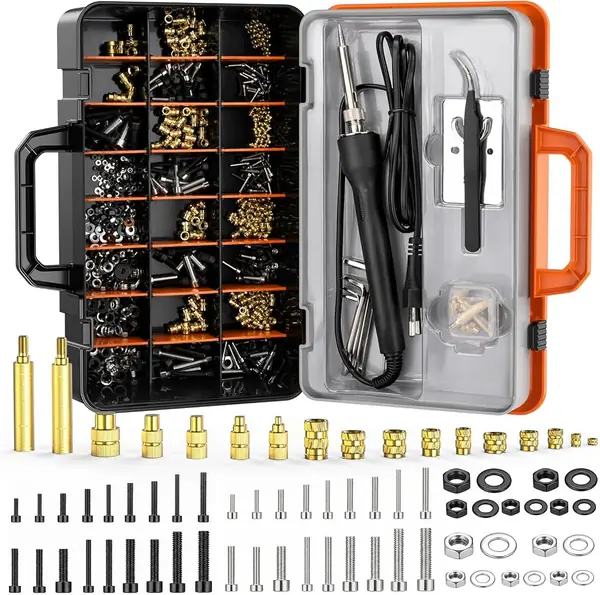
Preciva threaded insert set with 60W soldering iron and M2–M6 heat-set tips

Bulk insert work

Track Score 90/100
Power
60W
Temperature Range
200–500°C (392–932°F)
Included Insert Tips
M2, M3, M4, M5, M6
Included Pieces
750 pieces
View on Amazon

The first thing you notice about this kit is the count: 750 pieces, including 192 threaded inserts, 194 bolts, and 182 nuts. If you build in batches, that is the reason to look here instead of the smaller 3DZWMAN kit. The iron is a 60W digital unit with a 200–500°C range, and the five heat-set tips cover M2 through M6. The temperature buttons and large gauge are easy to read, which matters when you are setting a different temperature for PLA, PETG, and ABS.

We found the tip-change design more convenient than expected. The split collar lets you unscrew one tip and seat another without taking the whole sleeve apart, so switching from M3 to M4 is a bench-side job rather than a toolbox job. The kit also includes a tweezer and holder, which rounds out the setup. The lower end of the temperature range is 200°C, so it will not go as low as the 3DZWMAN kit; for most PLA and PETG insert work that is fine, but very heat-sensitive plastics may want the wider range.

The trade-off is size range. Preciva stops at M6, while the 3DZWMAN kit goes to M8. If your projects use M8 inserts, this is not the kit. If you mostly use M3 and M4 and want a deep hardware drawer, the larger count is the better buy. We also like that the iron and small parts can stay together on the bench, which makes a run of inserts feel less like a scavenger hunt.

Worth Noting

  • No M8 insert tip in the set
  • Lower range stops at 200°C
Our Verdict

Choose this if you go through a lot of M2–M6 inserts; the larger hardware count makes it the better bulk kit for repeated builds.

Check Latest Price
3.

Q-MING 80W Soldering Iron Kit Best Budget Iron

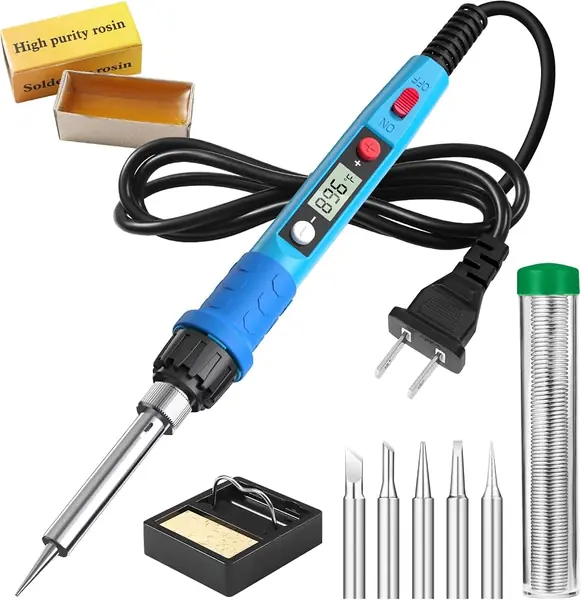
Q-MING 80W blue soldering iron pen with LCD display and five tips

Budget insert work

Track Score 89/100
Power
80W
Temperature Range
180–480°C (356–896°F)
Included Tips
5 soldering tips
Display
LCD digital
View on Amazon

Not every insert job needs a dedicated kit. If you already own heat-set tips, or you only press a handful of inserts a month, a simple pencil iron is enough. This Q-MING kit is the budget option we point to first: 80W, a claimed 20-second heat-up, an LCD screen, and a temperature range of 180–480°C. The five included tips are standard soldering shapes, not insert tips, so check the collar before you order a heat-set set.

The iron is light and the handle stays comfortable during longer sessions. We like the on/off switch and the digital readout, because you can set a temperature and see it without guessing from a dial. The stand is basic, but it gives the hot iron a place to rest. The kit also includes solder wire, flux paste, and a sponge, which makes it a complete starter package for general soldering.

For insert work, the limitation is the tip interface. Q-MING does not ship with heat-set tips, and the tip mount is not specified. That is a check-before-you-buy step, not a dealbreaker. If you already have a set of insert tips that fits, this is a lot of iron for the money. If you want everything in one box, the 3DZWMAN kit is the safer choice.

Worth Noting

  • No heat-set tips included
  • Tip mount not specified for insert tips
Our Verdict

We like this as a first iron for light insert work, provided you source heat-set tips that fit its collar.

Check Latest Price
4.

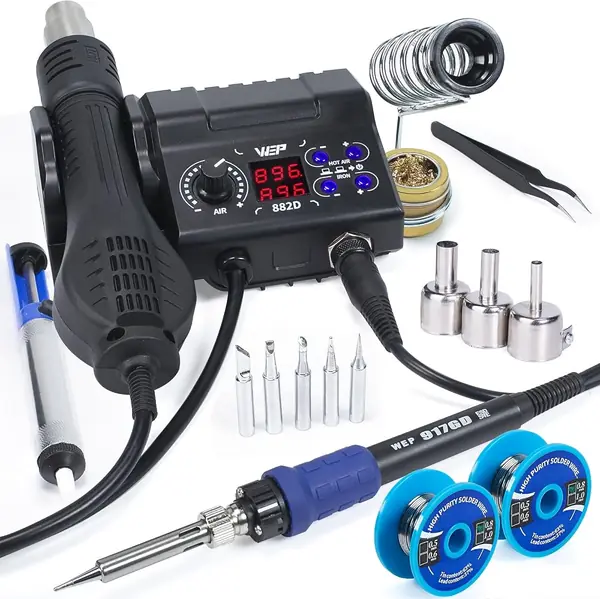
WEP 882D Soldering Station Best for Electronics Rework

WEP 882D 2-in-1 soldering and hot-air rework station with accessories

Electronics plus inserts

Track Score 88/100
Power
750W
Included Tips
5 soldering tips
Hot Air Temperature
212–896°F
Soldering Temperature
392–896°F
View on Amazon

The hot-air handset is the reason this station costs more than a plain iron, and it is also the reason to consider it. The WEP 882D combines a 750W soldering station and a hot-air rework station in one compact body. The soldering iron runs from 392–896°F, and the hot-air side runs from 212–896°F with adjustable airflow. For insert work, you use the iron; the hot air is there for heat-shrink, SMD rework, and the occasional stuck part.

We appreciated the separate displays and switches. You can set the iron and the air gun independently, and the sleep mode gives the iron a low idling temperature when you set it down. The station includes five soldering tips, three hot-air nozzles, two spools of solder wire, a brass-wool cleaner, tweezers, and a desoldering pump. That is a lot of bench equipment in one footprint, and the PID control keeps the temperature steady enough for small electronics.

The catch is that this is not an insert-specific tool. It does not include heat-set tips, and the soldering iron's lower limit is 392°F, which is above the 180°C floor some very heat-sensitive plastics want. If you already do electronics repair, those are easy trade-offs; if you only press inserts, a dedicated kit is simpler and cheaper. We like it as a dual-purpose station for a maker who solders and prints.

Worth Noting

  • No heat-set insert tips included
  • Soldering iron starts at 392°F
Our Verdict

For makers who also repair circuit boards, this station earns its space by adding hot air to a capable soldering iron.

Check Latest Price
5.

YIHUA 926 III Soldering Station Best Bench Station

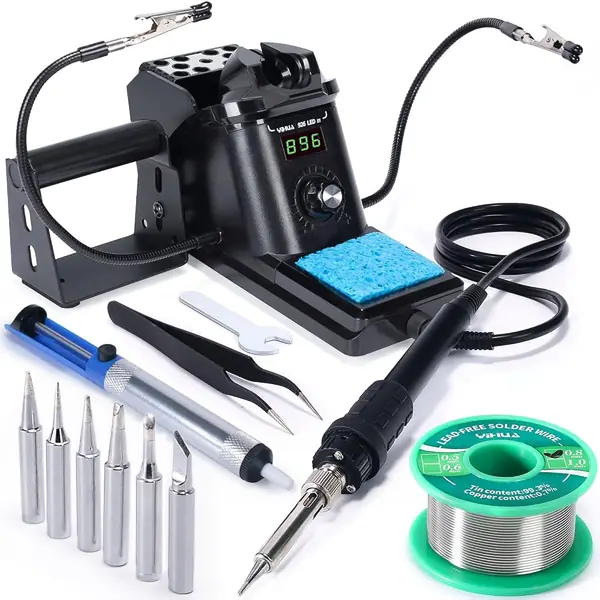
YIHUA 926 III digital soldering station with helping hands and six tips

Bench station work

Track Score 87/100
Power
60W
Temperature Range
194–896°F
Included Tips
6 extra iron tips
Helping Hands
2 clip arms
View on Amazon

The two clip arms are the first thing you see on this station, and they are more than a gimmick. They hold a small printed part steady while you bring the iron in, which is exactly the kind of third hand insert work needs. The YIHUA 926 III is a 60W digital station with a 194–896°F range, six extra iron tips, auto sleep, and calibration support. The integrated holder keeps the iron close without taking over the bench.

We like the temperature calibration feature. It lets you correct the display if the tip runs hot or cold, which is useful when you are trying to hold a narrow insert temperature. The sleep mode is adjustable, and the digital readout is easy to see. The included 900M-series tips are standard soldering shapes, not heat-set tips, so you will need to add insert tips that fit that mount. The helping hands are the feature that makes this station feel purpose-built for small assembly.

The caveat is durability: the heating element and tip life are the weak points, so we treat this as a light-duty bench station rather than a daily production tool. If you want helping hands for occasional insert work and general soldering, it is a strong value. If you need a tool that runs all day, a dedicated insert kit is the safer choice for insert-only work.

Worth Noting

  • Heating element and tip life are weak points
  • No heat-set insert tips included
Our Verdict

We keep this on the bench for its helping hands and easy temperature control, though we treat it as a light-duty station.

Check Latest Price
6.

WEP 926LED V3 Soldering Station Best Compact Station

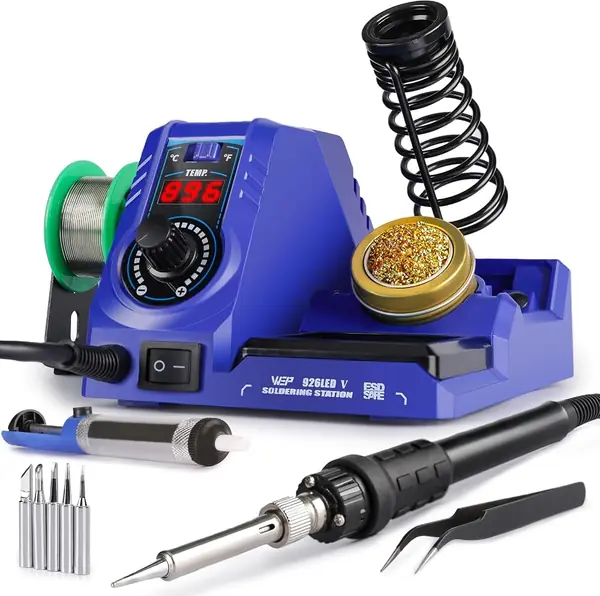
WEP 926LED V3 compact soldering station with integrated iron holder

Small bench spaces

Track Score 86/100
Power
60W
Temperature Range
392–896°F
Included Tips
5 soldering tips
Functions
Sleep mode and PID control
View on Amazon

The holder is molded into the station body, which sounds minor until you work on a crowded bench. The WEP 926LED V3 keeps the iron, the stand, and the controls in one small footprint. It is a 60W station with a 392–896°F range, a digital readout, sleep mode, and PID control. The kit includes five soldering tips, solder wire, tweezers, a desoldering pump, and a tip cleaner.

We like the control knob and the real-time temperature display. You can see the number change as you adjust, and the sleep mode drops the iron to a low idling temperature after ten minutes. The integrated holder is stable enough to park the iron between inserts, and the whole unit is light enough to move around the shop. The included tips are standard soldering shapes, so you will need to add heat-set tips that fit the iron.

The lower end of the range is 392°F, which is fine for most PLA and PETG insert work but not as low as the 180°C floor on the 3DZWMAN kit. The spool holder is also the weak detail; it can pop out while you are working. Neither issue changes the value for a small bench, but they are the reasons this is our compact budget station rather than the top pick.

Worth Noting

  • Spool holder can pop out during use
  • No heat-set insert tips included
Our Verdict

A compact station we recommend when bench space is tight and you want a controlled iron without spending much.

Check Latest Price
7.

FNIRSI HS-02A Soldering Iron Kit Best for Portable High-Power Work

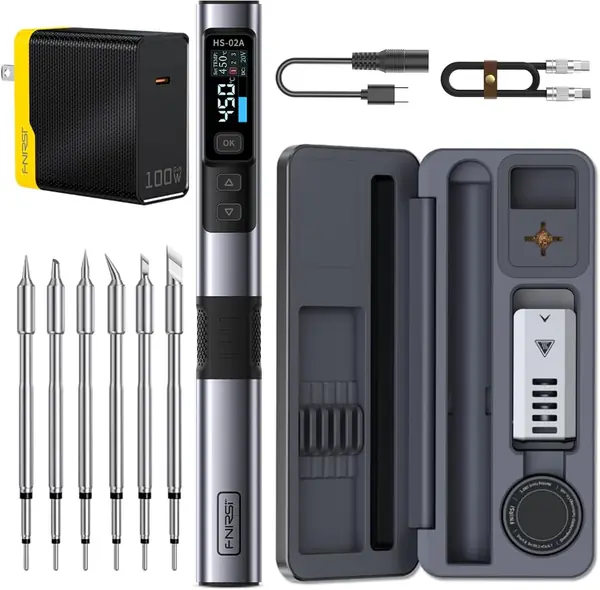
FNIRSI HS-02A portable soldering pen kit in a hard storage case

Portable high-power work

Track Score 85/100
Power
100W
Temperature Range
212–842°F
Included Tips
6 F245 soldering tips
Presets
3 temperature groups
View on Amazon

A 100W iron in a hard case is a different proposition from a bench station. The FNIRSI HS-02A is a portable soldering pen with a 212–842°F range, six F245 tips, three preset temperature groups, auto sleep, and a case that holds the iron, tips, stand, and brass cleaner. It is the kit we take when the work is away from the bench.

The preset temperatures are the feature we appreciate most. You can store three settings and jump between them without scrolling through a menu, which is useful when you move from a low-temperature insert job to a hotter wire joint. The pen handle is comfortable, and the case keeps the tips organized. The power delivery is flexible, but the iron needs a capable USB-C power supply to reach its top output.

For insert work, the limitation is the tip ecosystem. The included F245 tips are fine soldering shapes, not heat-set insert tips, and the kit does not include brass inserts. You also pay a premium for the portability and the case. If you already have a bench station, this is a second iron for travel and tight spaces; if you are buying one tool for inserts at home, the 3DZWMAN kit is more direct.

We still like having it in the kit. The high power reserve means it recovers quickly when you press a larger insert, and the case makes it easy to keep the iron and tips together. It is not the simplest first purchase for insert work, but it is the one we pack when the job is not at the bench.

Worth Noting

  • No heat-set insert tips included
  • Needs a capable USB-C power supply
Our Verdict

Choose it for high power and a case to carry, not as the simplest insert kit.

Check Latest Price

How We Tested Soldering Irons for Heat-Set Inserts

We filtered out irons that couldn't hold the plastic-melting window or take an M2–M8 insert tip, then narrowed by included hardware and whether the tip shank matched commonly sold insert tips. Twelve irons and stations came in for eight months on a bench in a spare room, window cracked, a fan pulling fumes away from the work. The parts were real: enclosure panels for two printers, a drill guide, drawer dividers, and a router-table jig that needed inserts in every corner, alongside ordinary soldering repairs.

We timed each iron from cold to working temperature with a thermocouple taped to the tip, then checked the display against that reading at three points across the insert window. The run that mattered was six to eight inserts into one bracket, watching how far the temperature fell on the second and third and how fast it climbed back — that split the irons that could press a whole part from the ones that needed a breather. Tips that went gray and stopped taking solder came off the bench after a few weeks.

We switched temperature between a PLA part and a PETG part without looking away from the work, judging how readable the display was and whether the controls could be reached with the iron in its stand. Stands got a bump to the bench and a tug on the cord, and each iron was set down mid-job to see whether its sleep mode pulled the heat back. Helping hands were judged on whether they held a small bracket steady, and every kit moved to the kitchen table and back to see what its footprint cost. We noted whether the included spool of solder sat still and fed without kinking, then priced replacement tips and a bag of inserts against what each kit asked. Tips came off only after the iron cooled in its stand.

How to Choose a Soldering Iron for Heat-Set Inserts

Start With the Tip, Not the Wattage

A heat-set tip is sized to the insert's outer diameter, not the screw thread, so an M3 insert needs an M3 tip. A standard conical soldering tip can press an insert in a pinch, but it does not seat it as squarely. We look for a kit that includes the sizes a maker uses most, which usually means M2 through M8. The 3DZWMAN kit covers that range; the Preciva kit stops at M6 but includes a much larger hardware count. If you buy an iron separately, confirm the tip mount before ordering aftermarket insert tips.

Look for a Temperature You Can Hold

Insert work happens roughly between 180°C and 300°C, depending on the plastic. PLA usually wants 180–220°C, PETG 210–230°C, ABS 230–250°C, and nylon or PC 280–350°C. A digital set point is easier to repeat than a numbered dial, and calibration is useful if the tip runs hot. The YIHUA 926 III includes calibration; the Q-MING kit gives you an LCD readout at a budget price. Start low, let the insert sink slowly, and raise the temperature only if the plastic resists.

Make the Bench Work for You

The iron stays hot between inserts, so a stable stand is not optional. We prioritize a stable stand over a fancy display because you will set the iron down dozens of times. An integrated holder saves space and keeps the tip away from the work; the WEP 926LED V3 builds one into the station body. Helping hands are useful when a small printed part wants to move; the YIHUA 926 III includes two clip arms. A dedicated insert press gives you vertical alignment, but it is a separate purchase, and none of these picks includes one.

Choose a Dedicated Kit or a Dual-Purpose Station

A dedicated insert kit is the shortest path: iron, tips, and inserts arrive together, and you do not have to guess about compatibility. A bench station or pencil iron makes sense if you also solder electronics, want a smaller footprint, or already own insert tips. The WEP 882D adds a hot-air handset for rework; the FNIRSI HS-02A is a portable high-power pen for work away from the bench. Both still need heat-set tips, so budget for those before you choose the cheaper iron.

Frequently Asked Questions

Final Verdict

For most 3D-printing makers, we recommend the 3DZWMAN Heat Set Insert Kit: it puts a temperature-controlled 60W iron, M2–M8 tips, and 380 brass inserts in one box, so you can start pressing without a second order. If you build in bulk and mostly use M3 and M4, the Preciva kit's larger hardware count is the better buy. If you also solder electronics, the WEP 882D adds hot air without giving up a capable iron.