Best Model Train Layout Software of 2026
Drawing a model railroad on graph paper feels straightforward until you lay real track on plywood and discover that a #6 turnout takes six inches more room than you sketched, your "gentle" ramp is actually a steep 6% hill that stalls locomotives, and the upper bridge clears the lower track by half an inch too little. Model train layout software solves those geometric surprises on screen before you spend a single dollar on roadbed, lumber, or switches.
For most Windows modelers, AnyRail hits the sweet spot between ease of use, enormous track libraries, and clean flex-track tools, while SCARM lets beginners plan complete small layouts for free up to 100 pieces. Mac users get a polished native experience in RailModeller Pro, budget-minded or Linux builders have a deeply capable free tool in XTrackCAD, and basement-empire engineers can step up to 3rd PlanIt for full 3D terrain and benchwork framing.
Why track planning CAD beats graph paper
Real model railroad geometry is less forgiving than freehand sketches make it look. Good layout software protects you from four classic beginner traps:
- Exact turnout geometry: A #4, #6, or curved turnout from Peco, Atlas, or Kato Unitrack has a fixed diverging angle, frog length, and straight lead. Software snaps real manufacturer dimensions together so a five-track freight yard actually fits inside your shelf width.
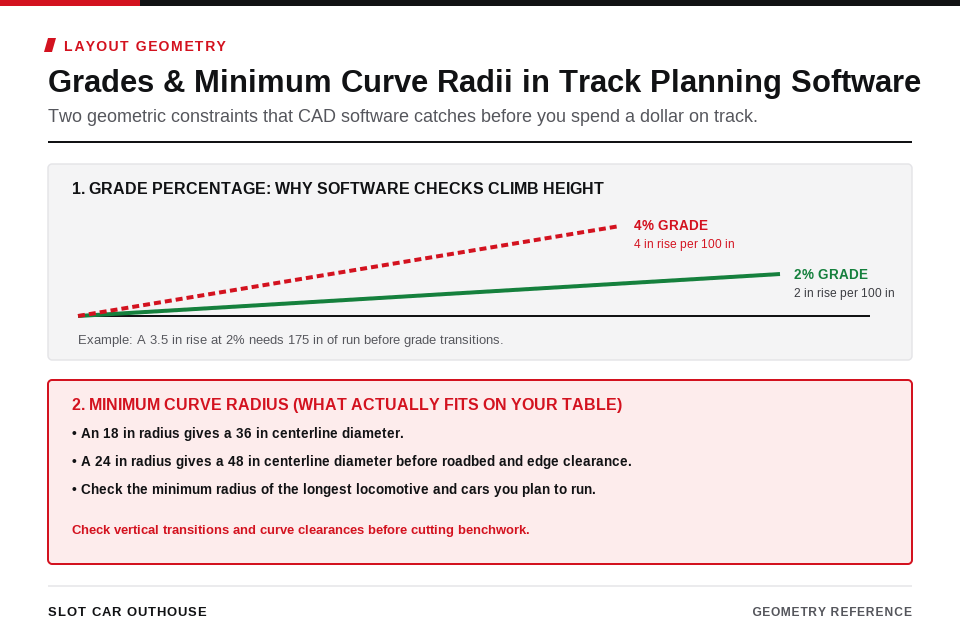
- Minimum curve radius warnings: Modern 6-axle diesels and 85-foot passenger cars bind or derail on tight 15-inch HO curves (or 9.75-inch N-scale curves). CAD lets you set a minimum radius alarm when bending flex-track so hidden tight kinks never sneak into your plan.
- Grade and vertical clearance math: A realistic model railroad grade should stay at 2% or less (2 inches of vertical rise per 100 inches of run), and rarely exceed 3% even on short branch lines. Because an HO overpass needs roughly 3.5 to 4 inches of railhead-to-railhead clearance (including bridge thickness), climbing over another track at a 2% grade requires 175 to 200 inches of ramp—nearly 15 to 17 feet! Layout CAD calculates exact percentages automatically so you see immediately whether an over-and-under figure-8 actually works in your room.
- Bill of Materials (BOM) and 1:1 printing: Once the plan closes cleanly, software exports an exact shopping list by manufacturer part number and prints 1:1 full-scale tiled templates that you can tape directly onto foam or plywood to trace centerline curves and turnout throws.
If you are still deciding between N, HO, O, or G scale before opening a CAD program, check our best model train scales guide first so your room dimensions and minimum radii match your chosen scale.
Best model train layout software compared
| Software | Operating System | Free Tier / Trial | Paid License | Standout Strength | Best For |
|---|---|---|---|---|---|
| AnyRail | Windows | Free up to 50 pieces | One-time purchase (~$60) | Cleanest Windows UI, huge track libraries, great flex-track & 1:1 print | Most Windows modelers (beginners to advanced) |
| SCARM | Windows | Free up to 100 pieces | One-time purchase (~$40) | Lightweight, fast built-in 3D view & terrain, generous free limit | Starters & small-to-medium layouts on Windows |
| XTrackCAD | Windows, macOS, Linux | 100% Free & Open Source | Free | Powerful easements, huge param libraries, built-in Train Mode | Budget builders, Linux/cross-platform, operational testing |
| RailModeller Pro | macOS | Express edition free (50 pieces) | One-time App Store purchase (~$40) | Polished native Mac UI, layers, 3D preview, slot car libraries too | All macOS model railroaders |
| 3rd PlanIt | Windows | Free demo (limited save/print) | One-time purchase (~$125) | Deep 3D terrain mesh, wood benchwork CAD, 3D train ops | Large basement, multi-deck & scenery-heavy layouts |
| Cadrail | Windows | Free demo | One-time purchase (~$90–$100) | Full 2D architectural/engineering CAD precision | Technical draftsmen wanting benchwork + room CAD |
AnyRail — easiest all-round choice for Windows
If you run Windows and want to go from zero experience to a buildable track plan in one evening, AnyRail is the most approachable tool available. Its familiar Ribbon toolbar keeps tools clear and uncluttered, and its track libraries are among the most comprehensive and frequently updated in the hobby—covering Kato Unitrack, Bachmann E-Z Track, Atlas, Peco, Walthers, Märklin, Lionel FasTrack, Micro Engineering, and hundreds more across Z through G scale.
AnyRail's flex-track bending is particularly intuitive: pull a smooth curve between two endpoints and it immediately flags if any point tightens past your chosen minimum radius. It also handles smooth elevation grades, multi-layer organization (benchwork, lower deck, main track, scenery), built-in 3D preview, automatic parts lists, and rock-solid 1:1 full-size printing. The free trial limits you to 50 track pieces—enough to test the workflow thoroughly—and the full license is a straightforward one-time purchase with no subscription.
SCARM — lightweight favorite with a generous 100-piece free tier
SCARM (Simple Computer Aided Railway Modeller) earns huge goodwill from beginners because its free edition allows up to 100 track pieces and objects—more than enough to design a complete N-scale coffee-table loop, an HO shelf switching layout, or a classic 4×8 starter oval without spending a penny.
It runs smoothly on modest Windows laptops, includes solid libraries for all major model train brands, and stands out for its snappy built-in 3D viewer that lets you sculpt basic terrain hills, add bridges, tunnels, and buildings, and inspect sightlines quickly. Upgrading to the paid license removes the 100-piece limit and opens optional extensions like the Model Trains Simulator for test-driving virtual consists on your plan.
XTrackCAD — 100% free, open-source, and deeply capable
XTrackCAD is the powerhouse free alternative, running across Windows, macOS, and Linux with zero piece limits or paywalls. Its learning curve is noticeably steeper—its toolbar icons and modal workflows feel straight out of the late 1990s—but spend two hours working through its built-in tutorial and you unlock serious railroad engineering tools.
Two features make XTrackCAD beloved by experienced layout designers: true easement (transition spiral) curves that smoothly ease straight track into curves just like prototype railroads (dramatically reducing derailments on long equipment), and a built-in Train Mode. Train Mode lets you place virtual locomotives and freight cars onto your drawing, throw turnouts, and test whether your runaround track is actually long enough to switch a five-car siding before you ever cut plywood.
RailModeller Pro — the clear native macOS winner
Mac users no longer need to run Windows virtual machines just to design a railroad. RailModeller Pro is built natively for macOS, complete with dark mode, crisp Retina rendering, Apple Silicon speed, multi-layer controls, grade calculators, 3D visualization, and automatic parts lists.
Its library catalog spans over 300 track systems across model trains and slot cars—a rare bonus if you also build racing layouts and want one Mac app that handles both (see our best slot car track layout software guide). You can try RailModeller Express free from the Mac App Store (up to 50 elements and one layer) before upgrading to Pro.
3rd PlanIt — heavy-duty 3D engineering for big layouts
When you are planning a multi-deck basement railroad with helixes, hidden staging yards, realistic mountain contours, and custom L-girder lumber framing, lightweight planners start to feel cramped. 3rd PlanIt is full 3D engineering CAD tailored specifically for model railroading.
You can draw your exact room walls, doors, and support columns, build layered wooden benchwork underneath your subroadbed, generate smooth contoured terrain meshes with rivers and rock cuts, and drive 3D trains across the finished scenery from a cab-view camera. It costs more and takes significantly longer to master than AnyRail or SCARM, so it makes the most sense for large, permanent layouts where architectural precision pays dividends.
Cadrail — precision drafting for traditional CAD minds
Cadrail (by Sandia Software) has served serious model railroaders for decades. Rather than behaving like a click-together sectional track toy, Cadrail operates much like classic 2D engineering CAD (similar to AutoCAD), giving you exact control over splines, easements, custom turnouts, room measurements, and benchwork layers. If you already think in layers, coordinates, and snap grids from mechanical or architectural drafting, Cadrail feels remarkably natural.
Essential features to check before committing to a program
Regardless of which program catches your eye, verify these five capabilities against the layout you actually want to build:
- Your exact track brand and code: Double-check that the built-in library carries your preferred track system—such as Kato N Unitrack, Peco Code 83/55, Atlas True-Track, or Lionel FasTrack—so turnout divergence and roadbed widths match reality.
- Flex-track and easement support: Sectional track snaps together like puzzle pieces, while flex-track bends into sweeping custom curves. Make sure your chosen software lets you bend flex-track smoothly, enforces a minimum radius limit, and ideally generates transition easements.
- Clear grade and vertical clearance tools: Look for live grade-percentage readouts along sloped sections and visual markers where an upper track crosses a lower track, confirming bridge thickness plus tall rolling-stock height (such as double-stack containers or hi-cube boxcars).
- 1:1 full-size tiled printing: Being able to print your turnout throats and tricky curve junctions at 100% scale on regular letter/A4 sheets (or send a large PDF to a local print shop for a single blueprint plot) eliminates measuring errors during track laying.
- Parts list / Bill of Materials export: Before shopping for model trains and track supplies, an automatic BOM tells you exactly how many left turnouts, right turnouts, rail joiners, and 3-foot flex-track sticks your design consumes—preventing mid-build delays.
Practical decision rules: which layout software should you pick?
- On Windows and designing your first small layout (under 100 pieces)? Download SCARM free and start building tonight.
- On Windows and planning a medium-to-large layout with flex-track? Try AnyRail's 50-piece demo; if the interface clicks, its one-time license is worth every penny.
- On a Mac? Install RailModeller Express free, then step up to RailModeller Pro once your plan grows past 50 pieces or needs multiple layers.
- Want zero cost, Linux support, or operational switching tests? Invest two hours learning XTrackCAD—its Train Mode catches yard-design flaws before you buy a single switch.
- Engineering a full-room or multi-deck basement empire? Look at 3rd PlanIt (for rich 3D terrain and framing) or Cadrail (if you prefer classic 2D CAD drafting).
Sources
Frequently Asked Questions
Stick to 2% or less (2 inches of rise per 100 inches of track) whenever possible, especially if you want to pull long freight or passenger trains smoothly. A 3% grade is generally the practical upper limit for short trains or logging/branch lines; steeper than 3.5%–4% rapidly cuts pulling power and causes wheelslip, particularly on curves where flange friction adds effective grade.
Yes. Both AnyRail and SCARM support flex-track smoothly alongside sectional track and turnouts. You anchor one end of the flex-track to a turnout or straight section, drag the other end to its target connection, and adjust curvature handles while watching the live radius readout to stay above your minimum curve limit.
Plan for roughly 3.5 to 4 inches railhead-to-railhead in HO scale (about 2 to 2.25 inches in N scale) to leave comfortable room for tall modern cars like double-stack intermodal containers plus the structural thickness of the bridge deck or upper subroadbed. Always follow NMRA clearance standards for your scale.
Yes—especially for complex yard ladders, curved turnouts, and tight shelf layouts where being off by half an inch pushes the last siding off the edge of the benchwork. You can either tape tiled home-printer pages together using the software's alignment crosshairs, or export a 1:1 PDF and have an office print shop plot it cheaply on large blueprint rolls.
Direct cross-program file editing is limited because each tool uses its own native format and track library definitions. Most programs can export standard image files, DXF/CAD drawings, or PDFs for sharing and printing, so it is best to test free trials first and stick with one program for a given layout build.